



Learn how to join a contest on Splash Sports from RunYourPool (RYP), OfficeFootballPool (OFP) and Splash Sports. This article will be useful for existing users from previous sites who are trying to figure out how to a join a contest that has been re-started by their commissioner on Splash.
Splash Sports
If you’re an existing Splash user, keep an eye on your email for invites from your friends to their contests. You can also log in to your Splash account on web or in the app and click on the notification bell on the top right to view if you’ve been invited to any contests and join through the bell.
If you’ve been invited, you can click on the message and join the contest.
RunYourPool
If your contest has been created by your commissioner, you can join from your RunYourPool dashboard by scrolling down to the Splash Sports section. Look for the contest that was created by your commissioner and click the contest card to enter.
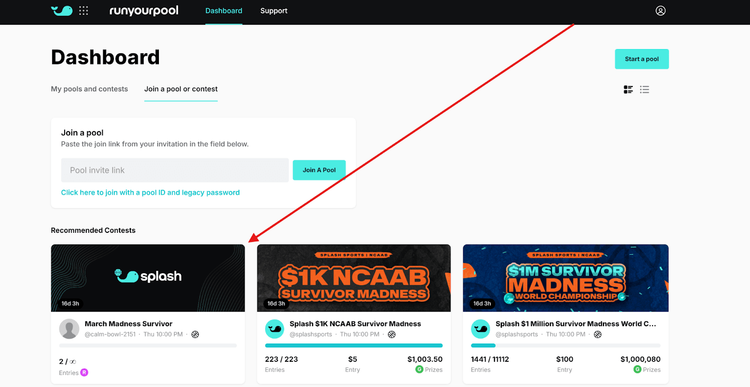
You can also join from the invite you received in your email from Splash Sports to join your commissioner's contest.
You can also log into Splash using your RYP credentials on the Splash website or mobile app, then click on the bell icon on the top right of the page to view if you’ve been invited to any contests and join through the message.
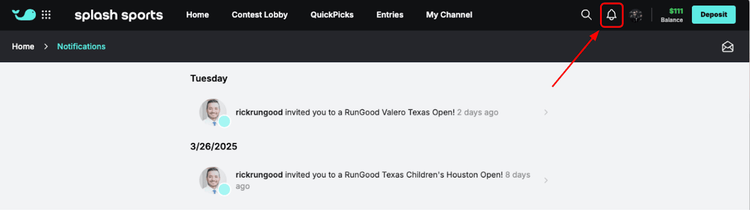
If you’ve been invited, you can click on the message to join the contest.
You can also click on the contest via text, email, social media, etc., that your commissioner has directly sent you.
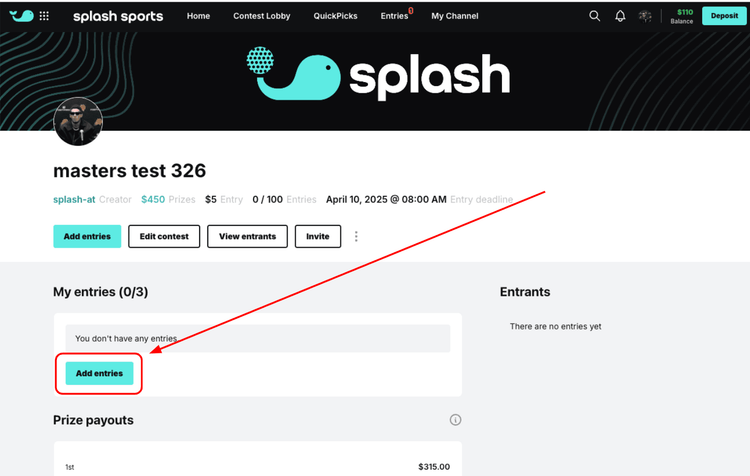
Once you land on the contest page, you’ll have to click “add entry” to officially join the contest. If you're joining a paid contest on Splash for the first time you'll be asked to verify your account before submitting your entry.
OfficeFootballPool
If you’re an OFP user, keep an eye out for an email from Splash Sports to join your commissioner's contest.
You can also log in to Splash using your OFP credentials on the Splash website or app experience, click on the bell icon on the top right of the page to view if you’ve been invited to any contests, and join through the message.
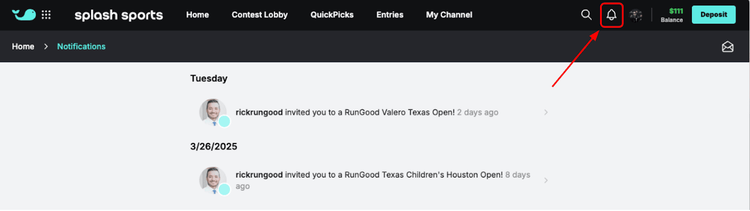
If you’ve been invited, you can click on the message to join the contest.
You can also click on the contest via text, email, social media, etc., that your commissioner has directly sent you.
Once you land on the contest page, you’ll have to click “add entry” to officially join the contest. If you're joining a paid contest on Splash for the first time you'll be asked to verify your account before submitting your entry.